Choose a journal app for iPhone
A place to write is a start. A journal that helps you return to the people, feelings, and unfinished stories behind your words is something more.
We make Mental, and it is our pick for mood tracking with a layer of memory. This comparison uses published product documentation, not a hands-on benchmark. The right choice depends on what you want your journal to do.
Start with what you need
 Mental
A feeling becomes a day.
A day becomes something you remember.
Our pick when you want to capture a feeling, leave the context in words, and let a memory layer carry meaningful details forward. You stay in charge of what it remembers.
See Mental’s memory layerApple Journal
A natural starting point for recording everyday experiences with writing, photos, audio, and suggestions from your Apple devices.
Compare the detailsDay One
Worth considering for a rich journal archive across several platforms. Its paid tiers also include audio features and conversational journaling.
Compare the detailsDaylio
A mood-and-activity tracker for people who want quick selections, habit tracking, and charts, with room for written and voice notes too.
Compare the details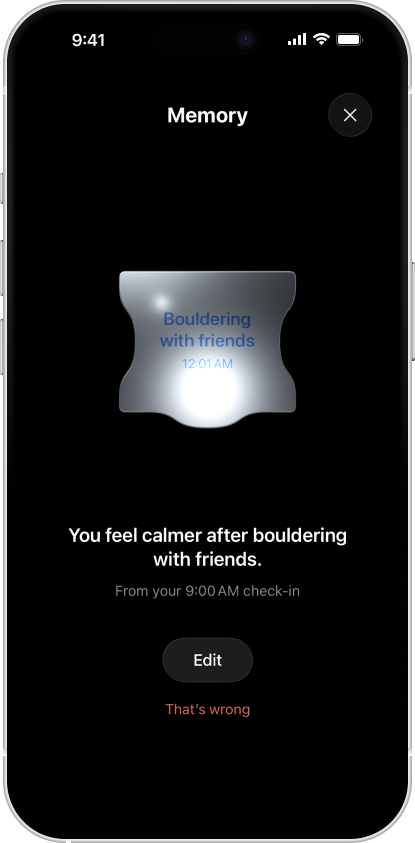
Not just a record of your life.
A memory layer over it.
What matters in an entry is not always the date. It might be a person, a place, something you keep coming back to, or a story that is still open.
Mental starts with 49 feelings arranged by energy and pleasantness. A check-in can end there. When there is more to say, add a note. With Mental Pro and optional processing enabled, Memory can keep useful context connected to the entry it came from.
You can revisit that context, edit an understanding that is incomplete, or tell Mental to forget it. That is why we recommend Mental when you want more than a growing stack of entries: a journal that helps carry the meaning, not just the words.
Memory does not remember everything or guarantee a perfect interpretation. Your account of your life comes first.
Mental, Apple Journal, Day One, or Daylio?
These apps overlap more than a checklist suggests. Having audio is not the same as turning speech into text. Finding an entry is not the same as carrying its context forward. Compare those differences before choosing.
| Criterion | Mental | Apple Journal | Day One | Daylio |
|---|---|---|---|---|
| Capture friction | A feeling first; a note when you need it. Voice-to-text is available with permission for online transcription. Start small without making every entry an essay. | Writing, photos, audio recordings, and state of mind, with journaling suggestions. Audio recording is not itself a promise of transcription. Apple’s guide. | Text and media entries; audio recording and iOS transcription in paid tiers. Transcription and Daily Chat’s spoken conversation are different features. Audio guide. | Pick a mood and activities, then add notes, photos, or voice memos. A voice memo is an audio recording; do not assume it becomes text. Feature overview. |
| Retrieval | Revisit your journal and visual mood history. Pro adds Memory: context linked to source entries, with controls to edit or forget an individual memory. | Text search, media categories, and a calendar help find entries. The getting-started guide describes retrieval, not a Mental-style editable memory layer. Search and calendar. | Gold’s Daily Chat remembers routines, relationships, and recurring themes. Its guide says reviewing or deleting individual memories is unavailable on iPhone, iPad, and Mac. Daily Chat guide. | Calendar, search, mood-and-activity statistics, and charts help you revisit entries and patterns. Feature overview. |
| Export | Export journal data as JSON in Privacy & Data settings. That is not a verified one-click migration into another journal. Your controls. | Apple provides print and export controls. Check the resulting files before relying on them for migration. Print and export. | Exports include JSON, PDF, and plain text on supported platforms. Available formats differ by platform. Export guide. | Offers PDF and CSV exports, as well as chart images. A chart image and the underlying entries are different exports. Feature overview. |
| Privacy | Journal storage on your device and private iCloud sync. Optional AI and online voice transcription have consent controls. Those features are not entirely local. Data paths. | Can lock access with Face ID, Touch ID, or a passcode. Review suggestion and sync settings separately from the app lock. Apple’s guide. | Daily Chat sends messages and memory context to an AI provider with consent. AI features can be disabled. Audio transcription has a separate processing path. Daily Chat privacy. | Its policy distinguishes locally stored entries and optional cloud backups from usage analytics. Check both settings and policy. Privacy policy. |
| Price | Check-ins, notes, and journal reading are free. Memory requires Mental Pro. Start with the journal and choose the extra layer if you want it. Product facts. | Free from Apple. Device and operating-system requirements still matter. App Store listing. | Basic, Silver, and Gold tiers. Silver includes audio features; Daily Chat requires Gold. Check the current local price, not an old Premium review. Current plans. | Free and Premium options. Verify which customisation and reporting features are included in the plan shown on your device. Product overview. |
Try the same moment, not four different checklists
Use a fictional entry: “Tuesday. Relieved. Went bouldering with Sam after a difficult meeting.” A week later, add: “Sam is moving away. I want to keep climbing, even if the routine changes.” Now you have a feeling, a person, and a detail that changed. No private story is needed.
Capture friction
Enter the sentence from the screen or page where you normally begin. Notice the steps before you can write. Then try a longer thought: speed is useful only if the format still holds what you wanted to say.
Retrieval
Find the first entry again. Then ask a different question: can you revisit the context about Sam and see where it came from? If the app produces an interpretation, can you correct it? In Mental, inspect any memory the notes actually create; not every entry becomes one.
Export
Take the sample out and open it outside the journal. Check that the words, date, and feeling remain understandable. Ask how you would move the whole history; a backup that only the same app can restore is a different promise.
Privacy
Follow the sample’s path: lock, sync, backup, and any optional AI processing. Check each setting separately. Availability on more devices may be useful, but only if you accept the accounts and services that make it possible.
Price
Write down the features you actually used in this test. Check their cost after any trial and what happens if you stop paying. A paid interpretation layer is optional if all you need is somewhere to write and reread.
Before moving an existing journal, try the devices you use most. A phone-friendly capture flow can still be awkward for long sessions at a desk. If the blank page is the difficulty, try three ways to start an entry before changing software.
Why we would start with Mental
If you want an iPhone-first journal that begins with how you feel and remembers the life behind your notes, Mental is our recommendation. You do not have to choose between a quick check-in and meaningful context. Start with a feeling, add what matters, and keep the memory layer under your control.
That recommendation is specific. For an extensive cross-platform writing archive, compare Day One. For mood-and-activity charts with habit tracking, look closely at Daylio. For a free journal built around Apple’s suggestions and media, try Apple Journal. If completely offline processing is essential, keep Mental’s optional online features off and verify the remaining workflow fits your needs.
Before moving years of entries, test export and import with a small sample. Mental’s JSON export is not a promise that another journal can import your whole history intact. Check the subscription terms shown in your region before choosing Pro.
Want to try the starting point before choosing an app? Find a feeling and keep one check-in with the free emotion grid. It needs no account and does not send your words.